


How Do I Perform a Factory Reset on My ZEN35 Scene Dimmer?

Trouble with your ZEN35 Scene Dimmer? Try factory reset!
If your Scene Dimmer is unresponsive to manual and Z-Wave control, and you've already tried excluding the device from your network, then a factory reset is the next step. A hard reset will erase all custom settings and recorded activity, returning the device to factory defaults.
Factory Reset
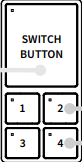
- Press and hold the switch button (large main button) for 20 seconds until the LED indicator changes to solid red.
- Release the button, and immediately after, tap remote button 1 once to complete the reset. The LED indicators on all buttons will flash red and cycle through colors to confirm a successful reset.
- NOTE: Remote button 1 is the small button in the upper left of the group of 4 small buttons.
After resetting the unit, try including it to your Z-Wave hub again to see if that helped resolve any issues you were seeing.
Reach out to us if your ZEN35 is still unresponsive or having issues after being reset!

